Skip to content

Passion Flow: a hobby journal with a mindful timer

Mobile app development for Passion Flow, a hobby journal: 26 iOS screens for passions, a timer, reflections, streaks and a feed, built in under 6 months.

Passion Flow

The engagement

Client
Passion Flow
Industry
Hobbies and habit tracking
Year
To follow
Duration
Under 6 months
Delivered
26 screens, iOS: onboarding, the passion journal, create passion, the mindful timer and streak, the reflection composer, daily quotes, the feed, search and inbox, built full stack
Stack
To follow
Role
Full-stack development: design and build of the mobile app

Passion Flow is an iOS app for pursuing hobbies on purpose: list a passion for the day, do it with a mindful timer, reflect on it with a photo, a rating and feelings, and keep the streak. Plainbuilt designed and built it full stack and delivered it in under 6 months: 26 screens, from onboarding to the journal, the timer, the reflection composer and a community feed. The design rests on one loop: plan, do, reflect, repeat.

Who is Passion Flow for?

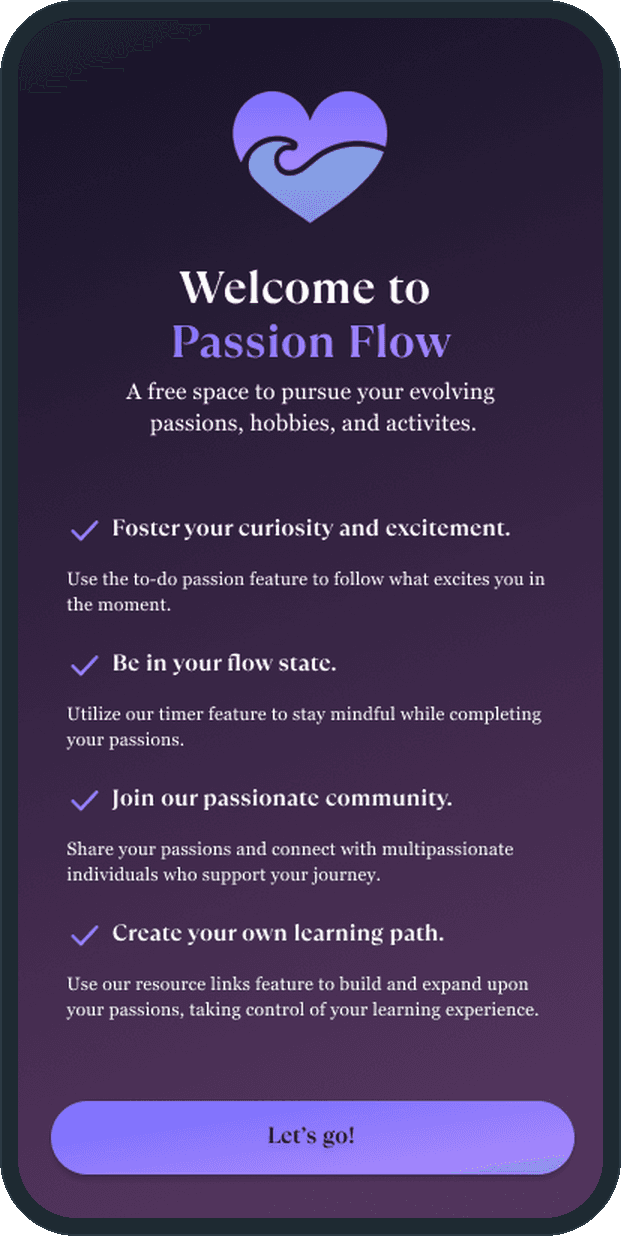
The person with a list of things they would love to do. The sample journal on the screens holds passions like learn photography and take pictures of nature, or hike and breathe in the fresh air. The onboarding names four things the app does for that person: a to-do passion list to follow what excites them in the moment, a timer to stay mindful while doing it, a community of people with more than one passion, and resource links to build their own learning path.

What did Plainbuilt build?

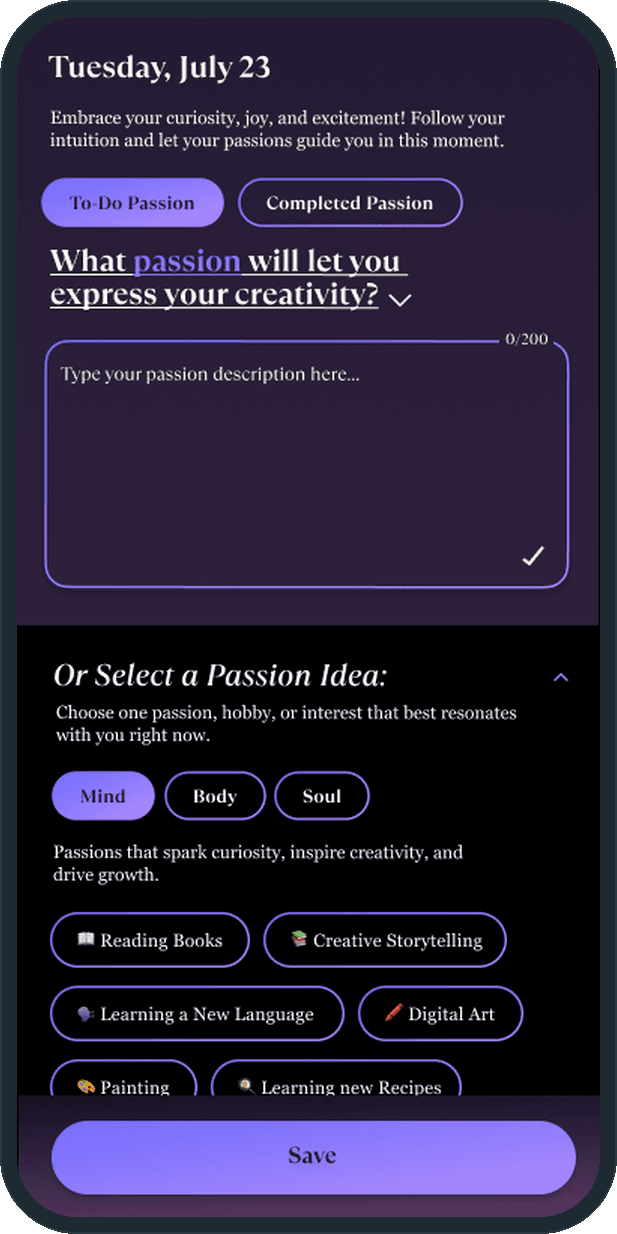
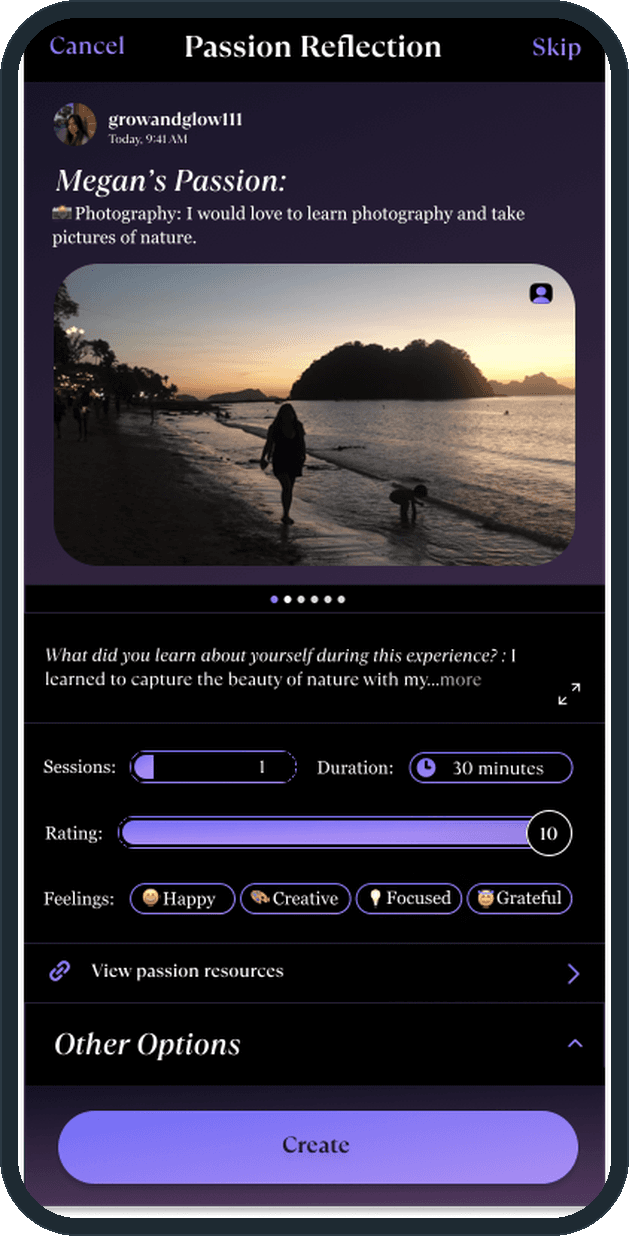
The whole app, 26 screens on iOS. Onboarding: a splash, the welcome screen with the four features, and five slides. The Passion Journal home: the profile, the day streak, the passion chips, the counts of passions, friends and inspirations, the To-Do Passion and Completed Passion tabs, and a swipe to edit a passion. Create Passion: a 200-character box under the day's date and the Mind, Body and Soul idea chips. The Mindful Timer with Pause, Finish and Skip Timer, then the Streak screen. The Passion Reflection composer: a photo or video, one of 8 prompts, sessions and duration, a flow-state rating out of 10, feelings from 15 emoji tiles, resource links, media and files, tagged people, a location, and who can see it, Public, Friends or Only You. The passion detail with its resources and its recorded reflections. A Daily Quote tab with quotes and affirmations. The Explore feed with Friends and Community tabs, Love, React and Comment, and the loved list. Search across friends, inspirations and contacts, other people's profiles, and Notifications with Requests and Inbox tabs. The bottom bar has five stops: home, the daily quote, a central plus, progress and profile.

What does a passion session look like?

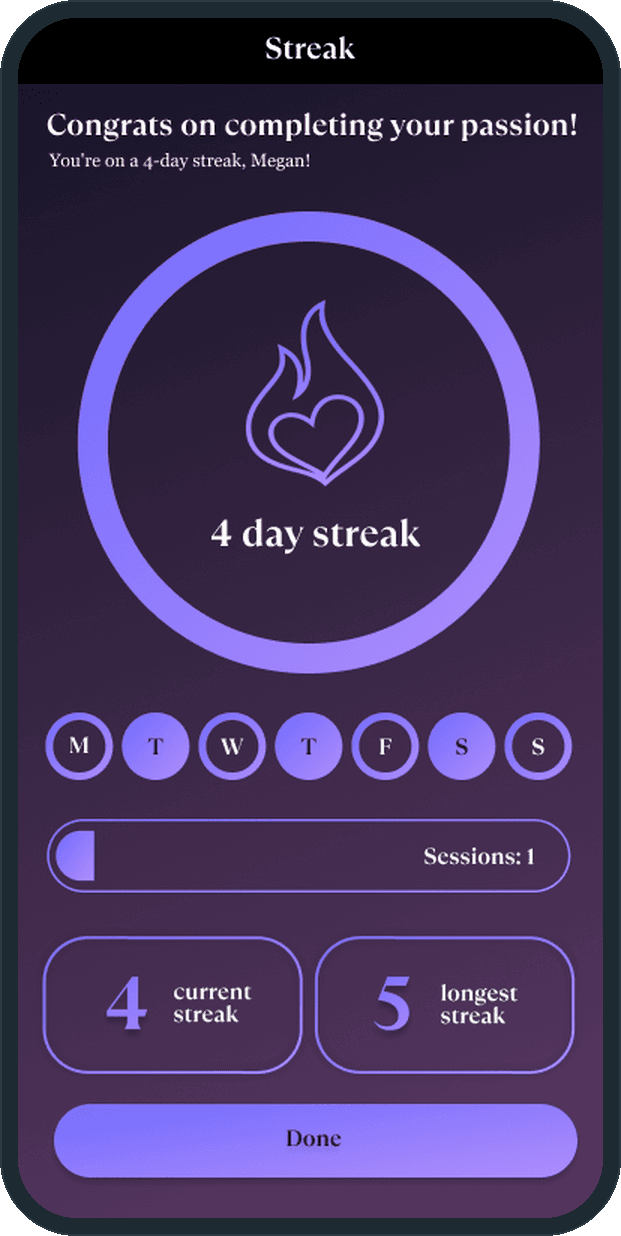
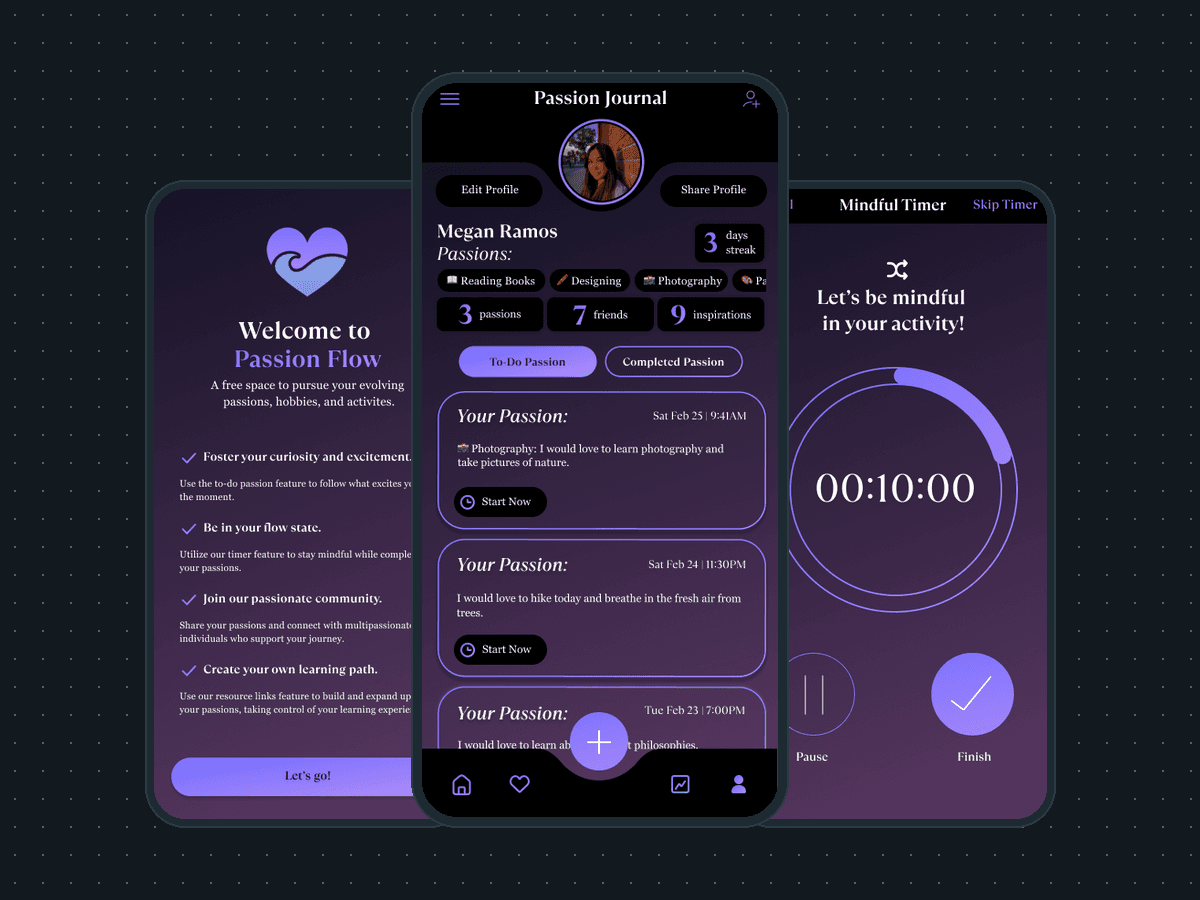
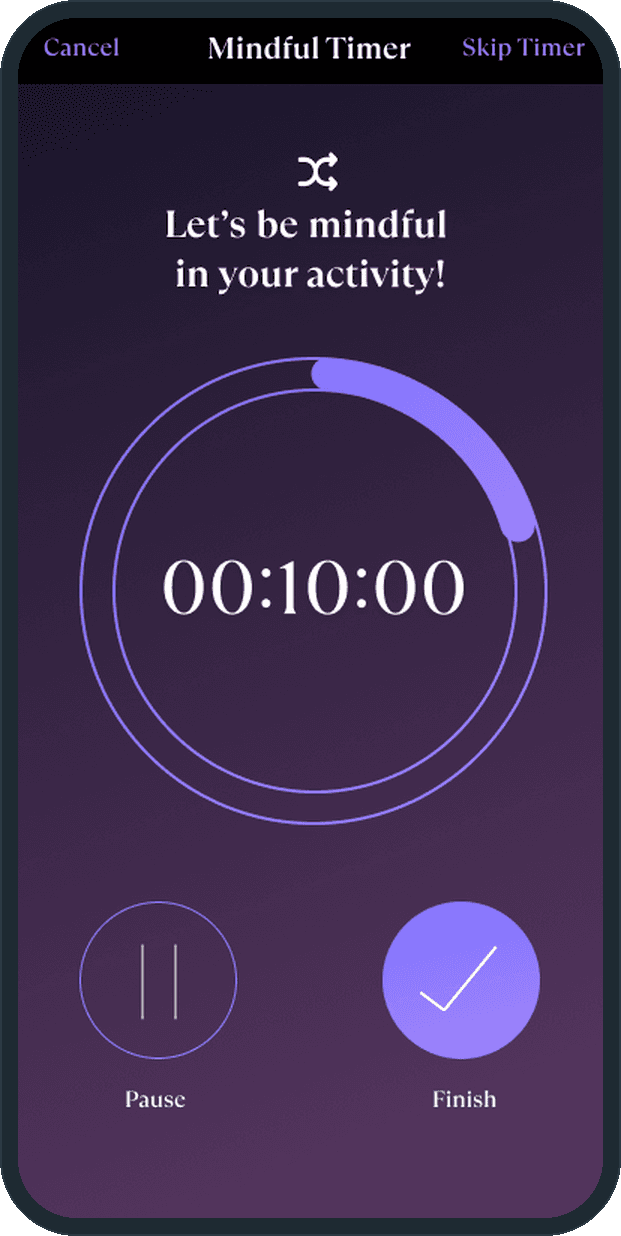
Start Now on a passion card opens the Mindful Timer: a ring that fills as the count runs, the count in the middle, Pause and Finish under it, and Skip Timer in the header for the days the person does not want a clock. Finish lands on the Streak screen: congrats on completing your passion, the day-streak ring with the heart-and-flame mark, the week's day dots, the sessions bar, and the current streak beside the longest. Done goes back to the journal. The Passion Reflection composer keeps the record of the session, with a Skip in its header for the days there is nothing to say.

Why does the timer get a whole screen?

Because the app is about the activity, not the app. The Mindful Timer shows one ring, one count and two buttons; nothing else competes for attention while the passion is happening. The line above the ring says it: be mindful in your activity. The record comes after, in the reflection, when the person has something to say.

Where does a day in Passion Flow start?

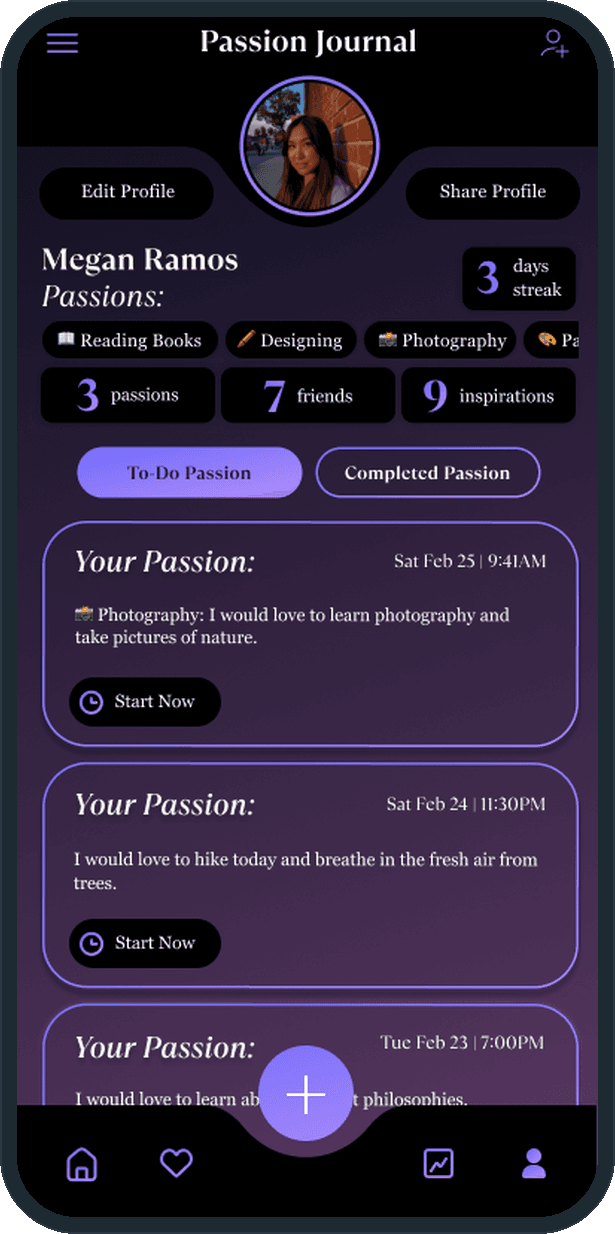
On the Passion Journal home: the profile, the day streak, the passion chips, the counts of passions, friends and inspirations, and two tabs, To-Do Passion and Completed Passion. Each to-do card carries the passion, its date and a Start Now button. Start Now opens the Mindful Timer: a ring that fills as the count runs, Pause and Finish under it, Skip Timer in the header.
  • Passion Flow: Where does a day in Passion Flow start?
  • Passion Flow: Where does a day in Passion Flow start?

How do I add a passion for the day?

Under the day's date the screen asks what passion will let you express your creativity. The person types up to 200 characters, or picks an idea chip from the Mind, Body or Soul lists (reading books, creative storytelling, learning a new language, digital art, painting) and taps Save. The passion lands on the To-Do tab of the journal with its own Start Now button.

  • Passion Flow: How do I add a passion for the day?

What happens after a session?

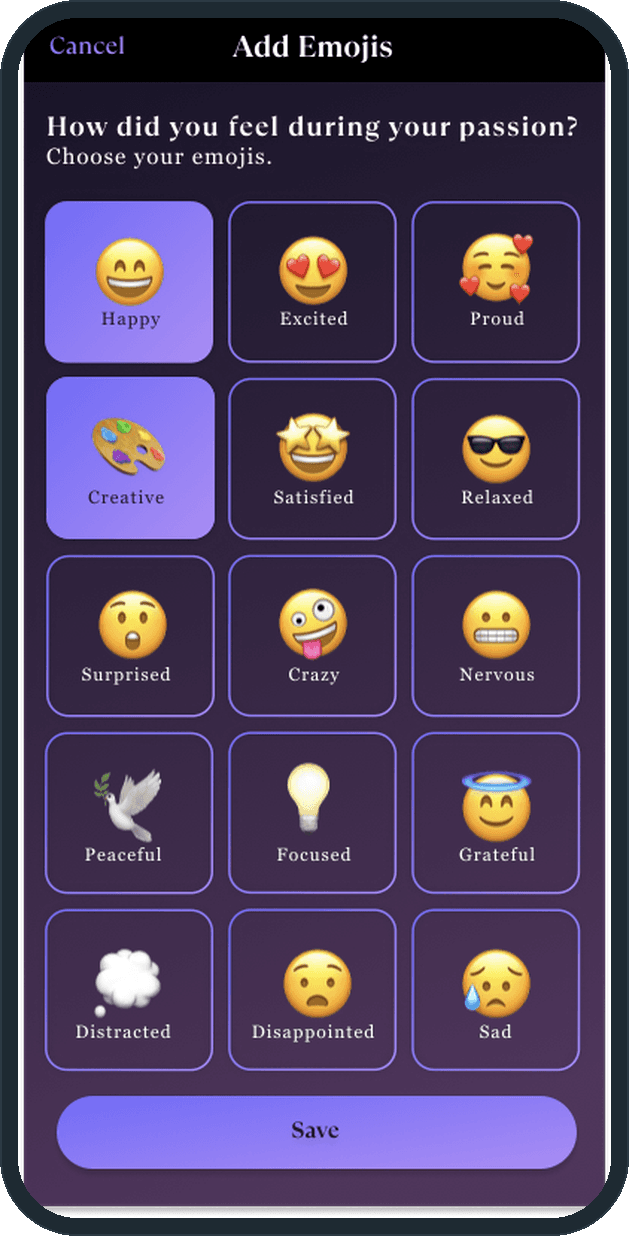
The Passion Reflection composer keeps the record: a photo or video, an answer to one of the prompts (what did you learn about yourself during this experience?), the session count and its duration, a rating of the flow state out of 10, and the feelings, picked from a grid of 15 emoji tiles from Happy to Sad. Under that sit the passion resources and the other options: tag people, add a location, and choose who sees it, Public, Friends or Only You.

  • Passion Flow: What happens after a session?
  • Passion Flow: What happens after a session?

How does it keep the habit going?

Finishing the timer lands on the Streak screen: a day-streak ring with the heart-and-flame mark, the week's day dots, the sessions bar, and the current streak beside the longest, then Done back to the journal. The journal home carries a streak count beside the person's name too.

  • Passion Flow: How does it keep the habit going?

Is there a community?

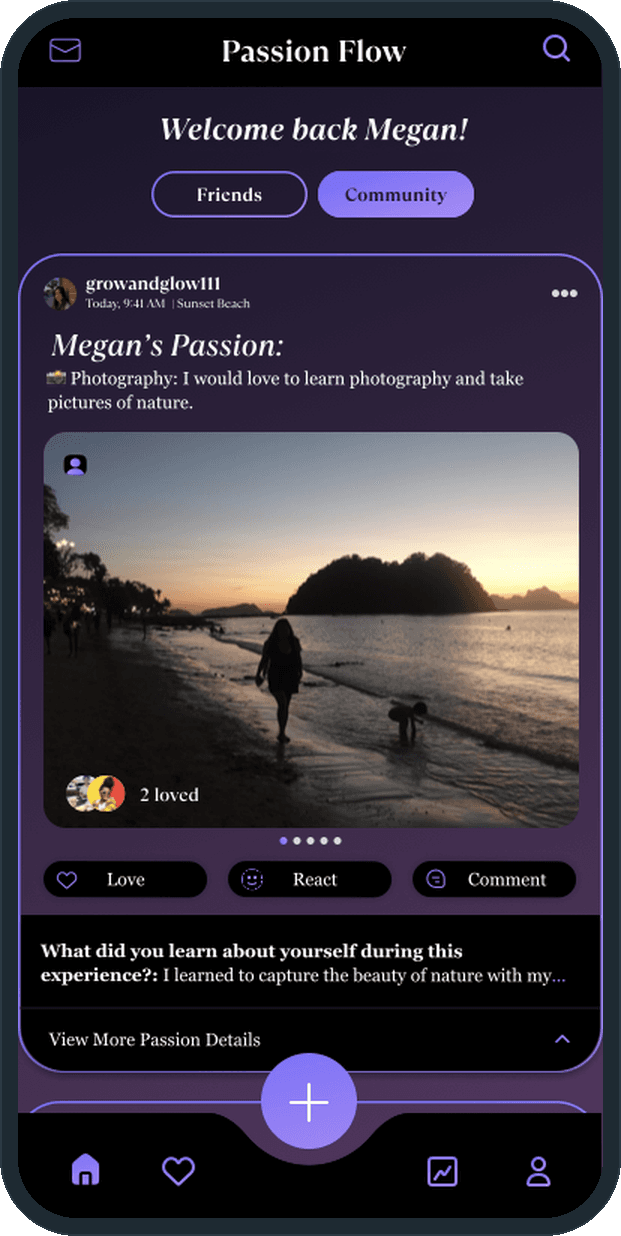
Yes, on the Explore feed under the Passion Flow header, with Friends and Community tabs. Each shared reflection is a card: who shared it and where, the passion, the photo, who loved it, and Love, React and Comment, with the prompt answer and a View More Passion Details line beneath. The header holds an inbox and a search, and the search covers friends, inspirations and contacts.

  • Passion Flow: Is there a community?

The decisions

  • The timer gets the whole screen.

    One ring, one count, Pause and Finish, and one line above the ring. Nothing else sits on the Mindful Timer, so the person is with the activity and not with the app. Skip Timer is there for the days a clock is not wanted.

  • A reflection is a record, not a checkbox.

    The composer asks for a photo, a prompt answer, the session length, a rating out of 10 and feelings from 15 tiles. Each finished passion becomes an entry the journal keeps, with its resources and reflections readable later.

  • Ideas sit under the empty box.

    Create Passion pairs the 200-character box with Mind, Body and Soul chips. The person who does not know what to do today picks one instead of writing.

  • Who sees a reflection is chosen each time.

    The composer's Share to option offers Public, Friends or Only You, so a reflection can stay with the person, go to their friends, or go to the community feed.

What was the outcome?

Built and delivered in under 6 months

One outcome per item, dated, or not disclosed: never an estimate.

More screens

  • Passion Flow

Which of our services apply

Common questions

Did Plainbuilt build Passion Flow?

Yes. Plainbuilt designed and built it full stack and delivered it in under 6 months.

What is on the 26 Passion Flow screens?

Onboarding, the Passion Journal with To-Do and Completed tabs, Create Passion with Mind, Body and Soul ideas, the Mindful Timer and the Streak screen, the Passion Reflection composer with prompts, a photo, a rating, feelings, resources, tagged people, a location and who can see it, a Daily Quote tab, the Explore feed with Friends and Community tabs, search, profiles and an inbox with requests.