Skip to content

Sendayo: a shift roster app for support workers

Sendayo, a shift roster app for disability support workers: 7 iOS screens for the week ahead, a roster week and a shift overview, built in under 6 months.

Sendayo

The engagement

Client
Sendayo
Industry
Disability support work
Year
To follow
Duration
Under 6 months
Delivered
7 screens, iOS, splash and onboarding, welcome and login, the week ahead, the roster week, the shift overview, built full stack
Stack
To follow
Role
Full-stack development: design and build of the mobile app

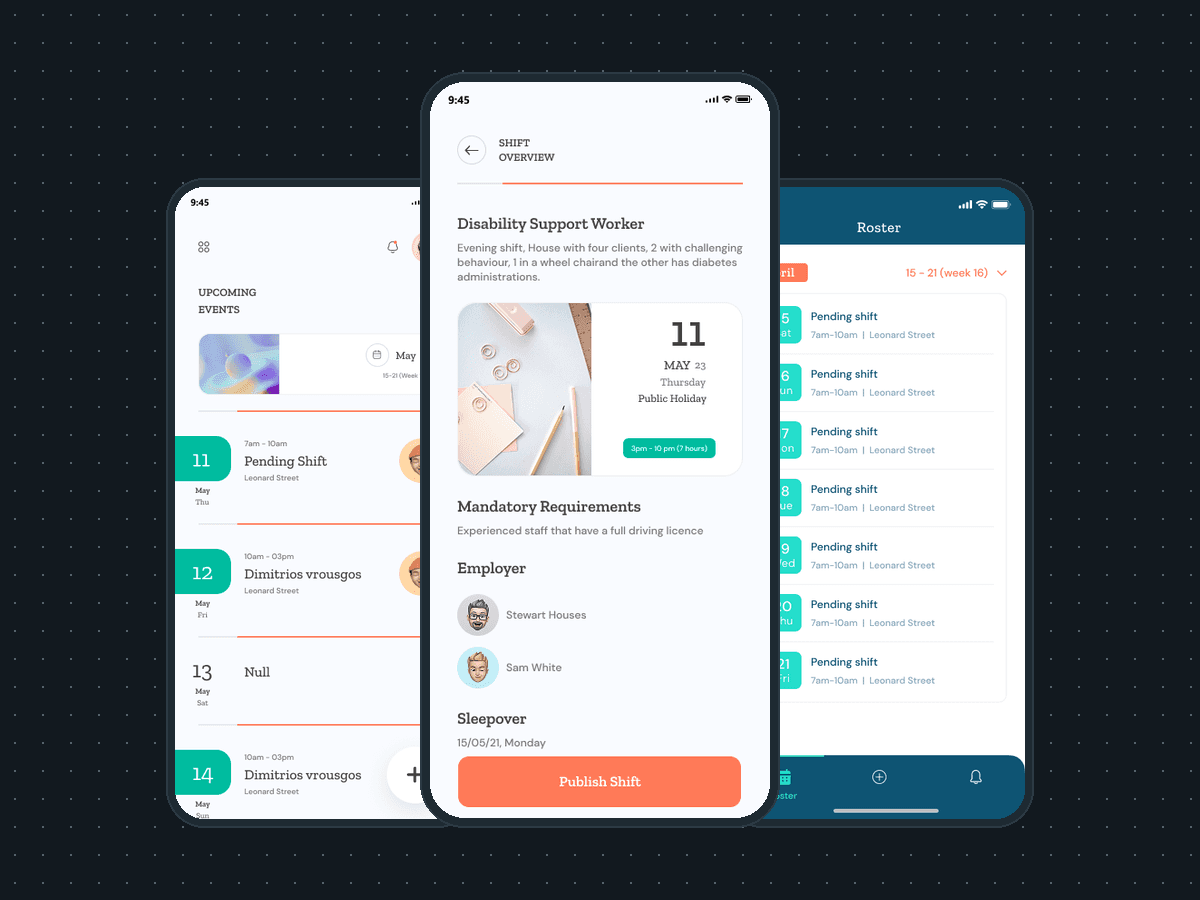
Sendayo is a shift roster app for disability support workers and the houses that employ them. Plainbuilt designed and built it full stack and delivered it in under 6 months: 7 iOS screens for the splash, onboarding, welcome and login, the week ahead, a roster week and a shift overview with a Publish shift button. The design rests on one row per day: the date on the left, then the hours, the house and the worker across.

Who is Sendayo for?

Disability support workers and the houses that roster them. The screens name the role, Disability Support Worker, and the setting: a house with four clients, an evening shift, a sleepover, a public holiday. The week ahead and the roster for a week show who is on each shift; the shift card holds the brief, the mandatory requirements, two employer contacts and the Publish shift button. The line on the splash and the welcome screen is the product's own: Sendayo puts the human element first.

What did Plainbuilt build?

The whole app, front to back, as the screens show it. A splash screen with the coral tile mark, the wordmark and the tagline. An onboarding screen. A welcome screen with the carer photos and two doors, Existing user and New user. Login with an email and a password, Remember me, Forgot the password, and Facebook, Google and Apple sign-in, with a Sign up link for a new account. A home titled Upcoming events: the week as one row per day with the hours, Pending shift or the worker's name, the street and an avatar, a week card above the rows and a plus button to add a shift. A Roster screen for one week, with the month in a chip, a week picker and a tab bar for Roster, add and notifications. A shift overview with the role, the brief, the date and the hours, the mandatory requirements, the employer contacts, the sleepover date and the Publish shift button.

What does the week look like?

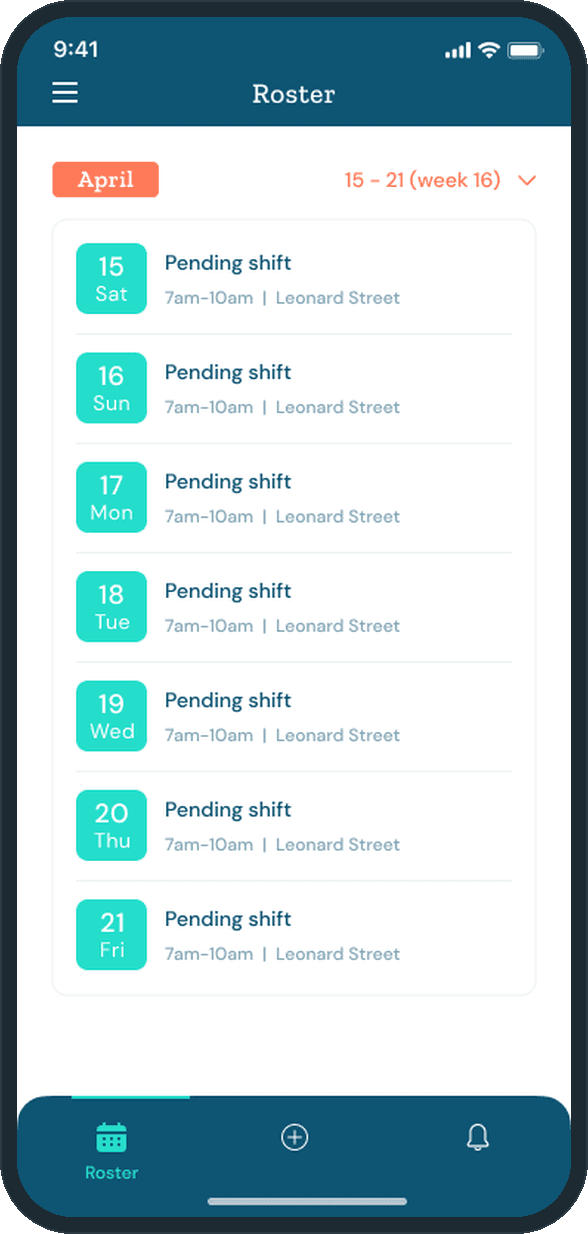
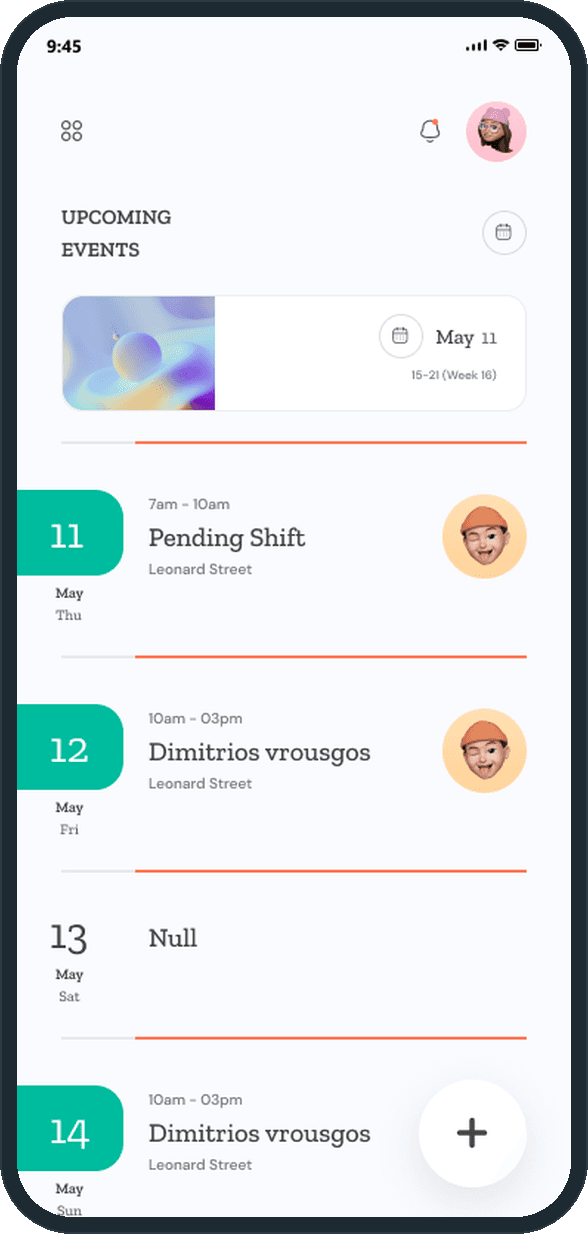
One row per day, on the home and on the roster. On the home, Upcoming events runs from 11 May: a teal badge with the date and the day, the hours (7am to 10am, 10am to 3pm), Pending shift or the worker's name, Leonard Street and the worker's avatar, with a coral rule between the days. On the roster, 15 to 21 April (week 16) is seven cards, each with Pending shift, 7am to 10am and Leonard Street, under an April chip and the week picker. A plus button adds a shift on both: floating at the foot of the home, in the tab bar on the roster.

Why does the shift card carry the brief?

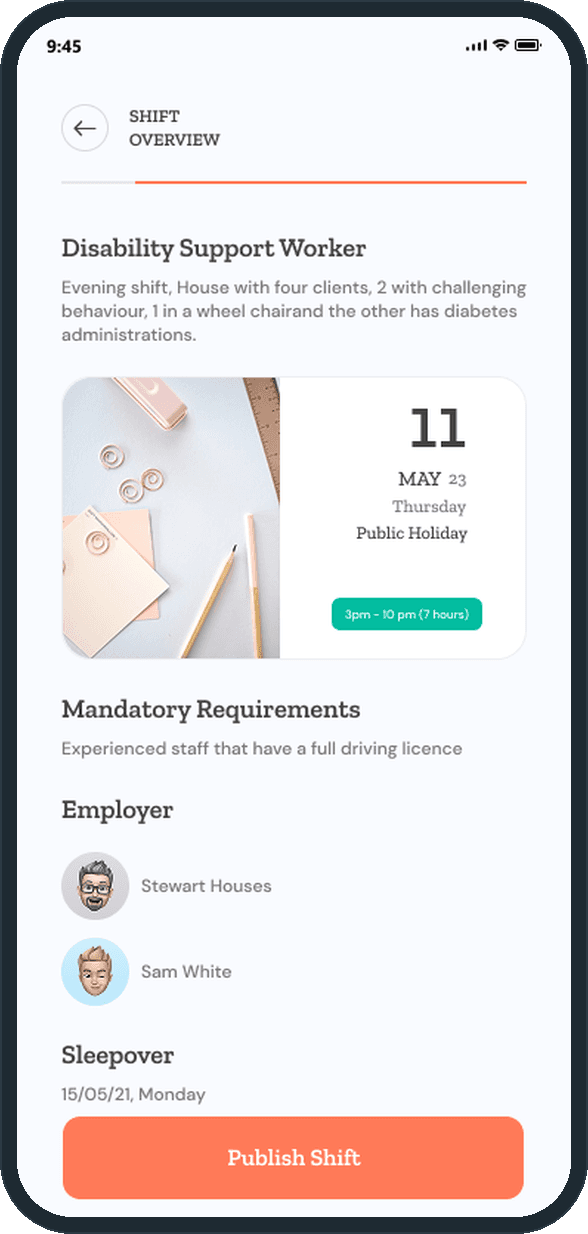
Because a worker needs to know what the shift is before the hours matter. The shift overview opens with the role and the house's own description of the shift: four clients, two with challenging behavior, one in a wheelchair, one with diabetes administrations. Then the date with its public-holiday flag, the hours with their length in a teal pill, the mandatory requirements as one sentence, the two employer contacts and the sleepover date. Publish shift is the last thing on the card, once everything above it is set.

How does a support worker see the week ahead?

From the home screen, titled Upcoming events. The week runs as one row per day: a teal date badge on the left, the hours (7am to 10am, 10am to 3pm), Pending shift or the name of the worker on it, Leonard Street, and the worker's avatar on the right. A week card above the rows reads May 11, 15 to 21 (week 16), with a calendar control beside the heading. A plus button at the foot adds a shift.
  • Sendayo: How does a support worker see the week ahead?

What does a shift card say?

The shift overview names the role, Disability Support Worker, then gives the brief in the house's own words: an evening shift in a house with four clients, two with challenging behavior, one in a wheelchair and one with diabetes administrations. Under it, the date, 11 May, a Thursday, flagged Public holiday, and the hours in a teal pill, 3pm to 10pm (7 hours). Then the mandatory requirements, experienced staff with a full driving license, two employer contacts with their avatars, the sleepover date, and the Publish shift button across the foot.

  • Sendayo: What does a shift card say?

How does the roster read across a week?

As seven cards under the month. The Roster screen shows 15 to 21 April (week 16), one card per day with a teal date badge, Pending shift, 7am to 10am and Leonard Street. April sits in a coral chip with the week picker beside it. A three-item tab bar holds Roster, the add button and notifications, so a new shift starts from the same bar on every day of the week.

  • Sendayo: How does the roster read across a week?

How does someone get in?

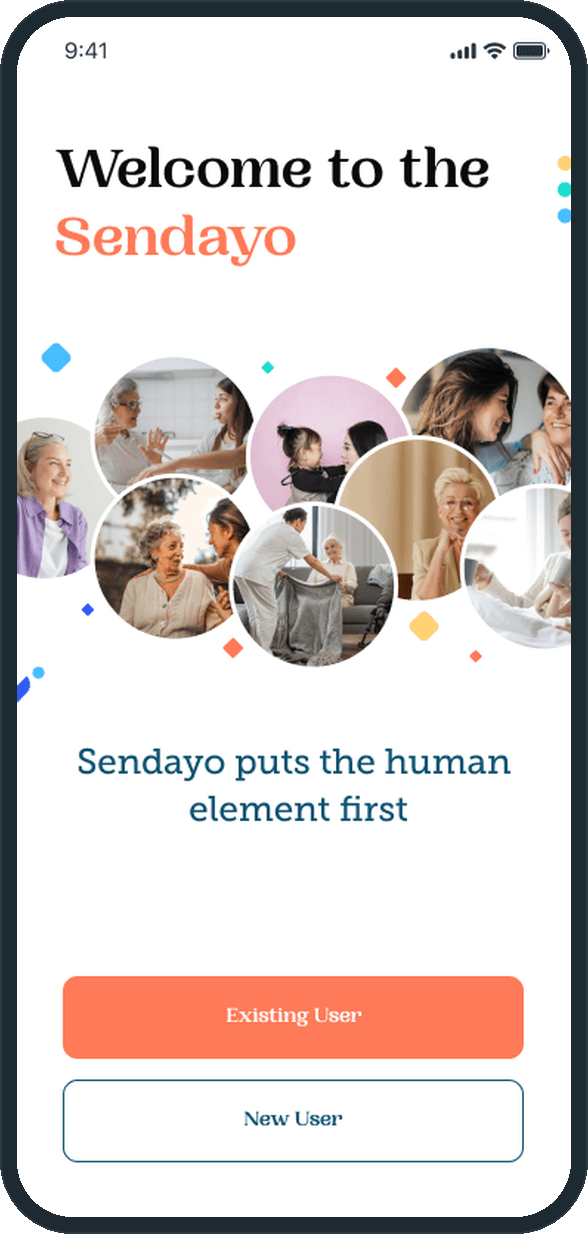
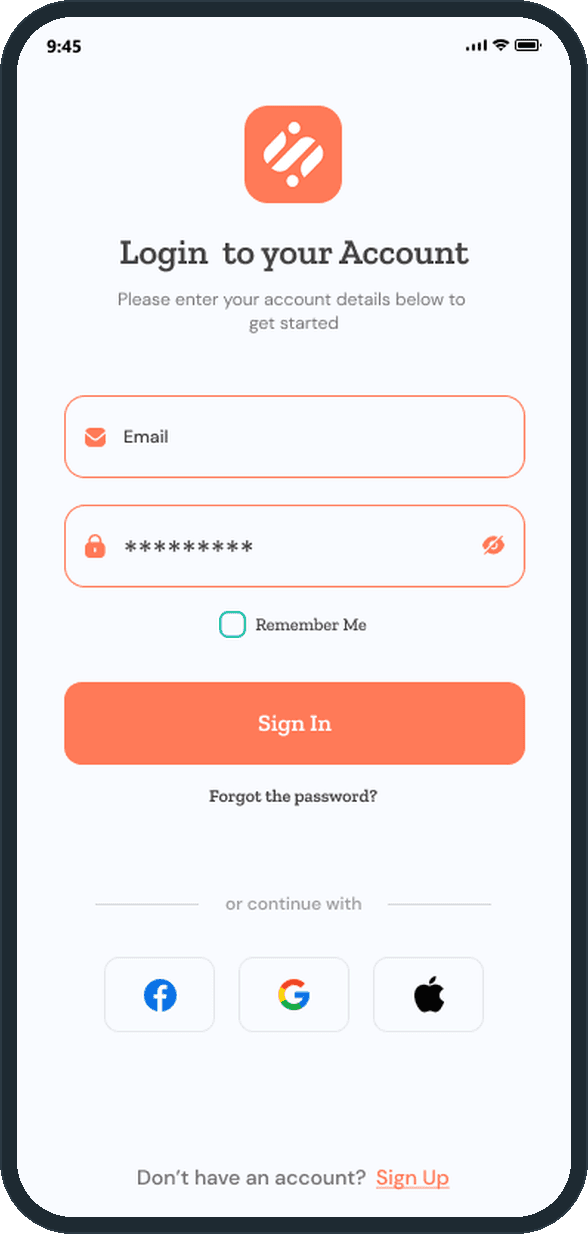
The welcome screen sets the line Sendayo puts the human element first under a cluster of round carer photos, then two buttons, Existing user and New user. Login takes an email and a password, with Remember me, Sign in and Forgot the password, or a Facebook, Google or Apple account. A Sign up link at the foot opens a new account.

  • Sendayo: How does someone get in?
  • Sendayo: How does someone get in?

The decisions

  • One row per day.

    The home and the roster both lay the week out as one row per day, the date in a badge on the left and what is on it, the hours, the house and the worker, reading across. A day with nothing on it keeps its row, so a gap in the week shows as plainly as a shift.

  • The brief before the hours.

    The shift overview opens with the role and the shift as the house described it: who lives there and what the shift involves. The date, the hours and the mandatory requirements follow. A worker reads what the shift is before deciding on the time.

  • The hours carry their length.

    Every shift shows its start and its end. The shift overview adds the length, 3pm to 10pm (7 hours), in a teal pill beside a public-holiday flag, and the sleepover gets a date line of its own, so nothing about the time is left to arithmetic.

  • Publish is the last thing on the card.

    The Publish shift button runs the full width of the foot of the shift overview, under the brief, the date, the requirements, the employer contacts and the sleepover. The shift goes out from the card that holds every fact about it.

What was the outcome?

Built and delivered in under 6 months

One outcome per item, dated, or not disclosed: never an estimate.

More screens

  • Sendayo

Which of our services apply

Common questions

Did Plainbuilt build Sendayo?

Yes. Plainbuilt designed and built it full stack and delivered it in under 6 months.

What does Sendayo do?

It rosters shifts for disability support workers and the houses that employ them. A person signs in with an email and password or a Facebook, Google or Apple account, sees the week ahead one day at a time with the hours, the street and the worker on each shift, reads the roster for a week, opens a shift overview with the brief, the date and hours, the mandatory requirements and the employer contacts, and publishes a shift from that card.