Skip to content

Modeling agency admin: the roster and the schedule

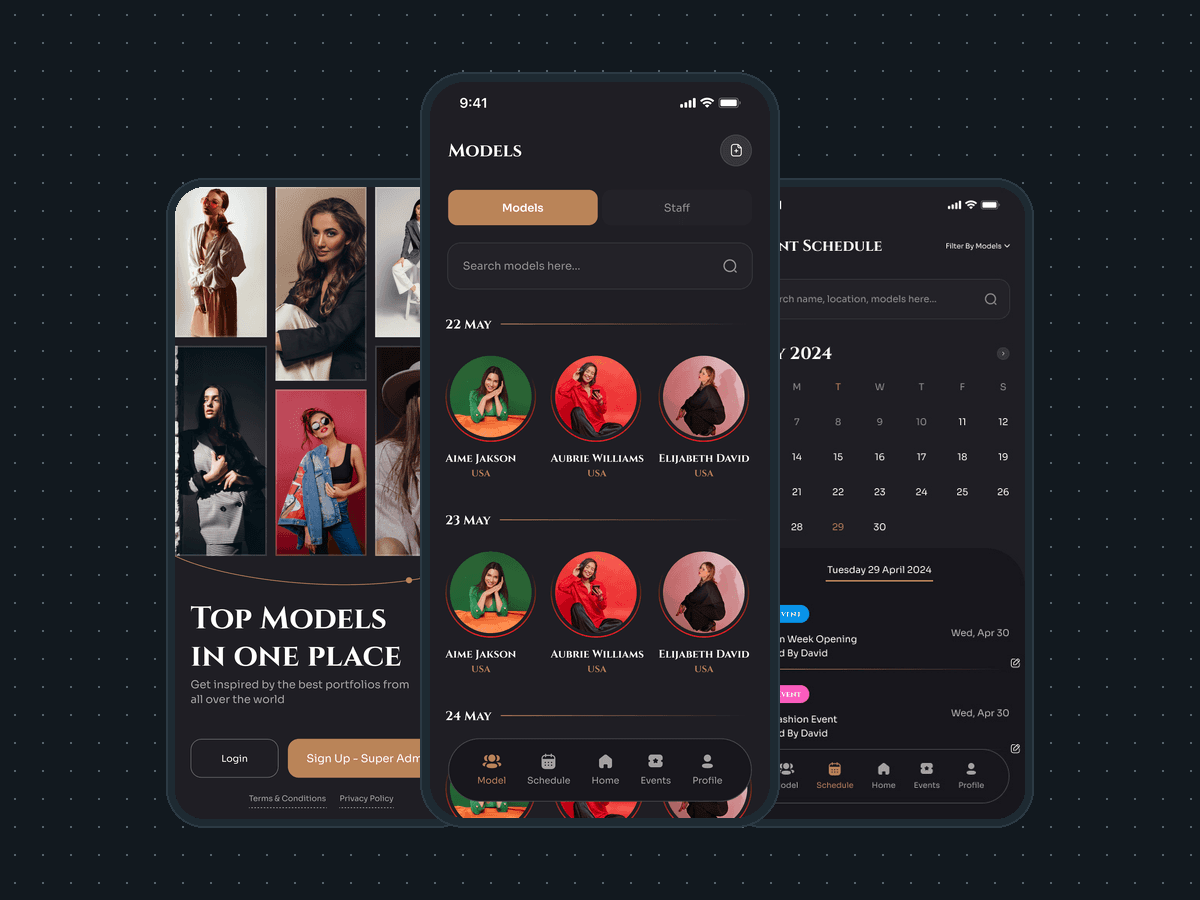
8 iOS screens for a modeling agency's admin: the model roster, a month event schedule with each day's bookings, event cards. Built full stack in under 6 months.

Modeling agency admin

The engagement

Client
A modeling agency
Industry
Modeling and talent agencies
Year
To follow
Duration
Under 6 months
Delivered
8 screens, iOS, onboarding and sign-in, the model roster and profile, the event schedule, the event cards and the edit form, built full stack
Stack
To follow
Role
Full-stack development: design and build of the mobile app

A modeling agency's admin app for iOS: the super admin browses the model roster, sees which models are booked on which day, runs a month calendar of events and invites a model to a casting. Plainbuilt designed and built it full stack and delivered it in under 6 months: 8 screens, from onboarding to the schedule. The design rests on the line from its own welcome screen, top models in one place.

Who is the modeling agency admin app for?

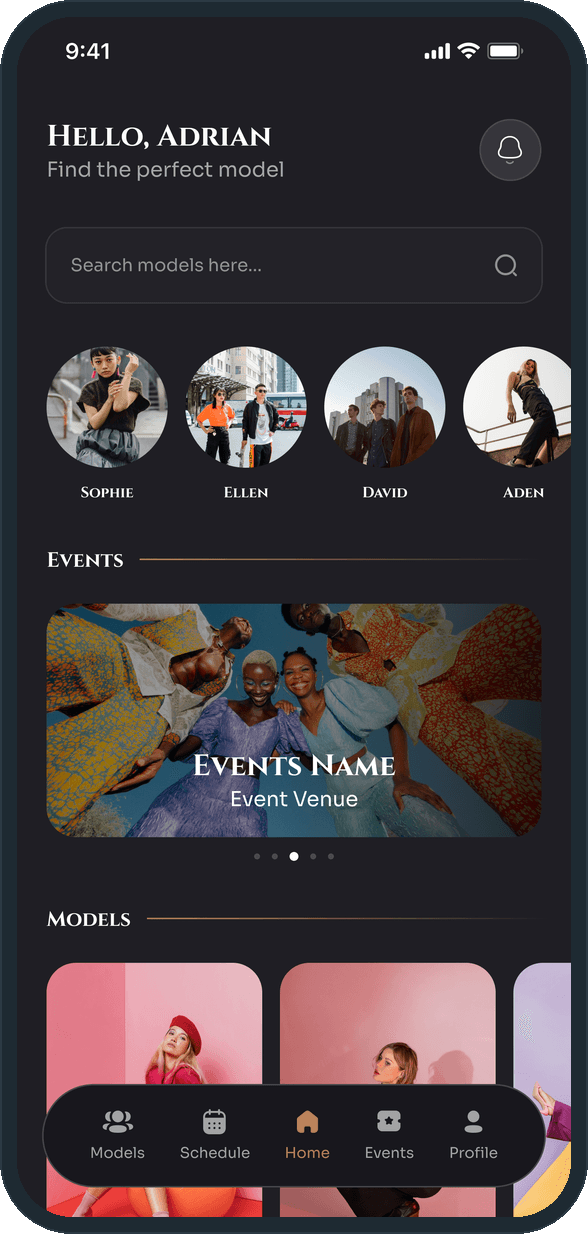
The agency, not the model. The welcome screen offers Login or Sign Up as super admin, and every screen after it belongs to the person who runs the agency. Home greets them by name and says Find the perfect model, with a model search, a row of model avatars, an Events carousel and a Models grid under it. A pill-shaped tab bar floats at the bottom of Home and the tab screens: Models, Schedule, Home, Events, Profile.

What did Plainbuilt build?

The whole admin app, designed and built full stack. Onboarding and the welcome screen, with login and super-admin sign-up. Home. The Models tab, with a Models and Staff toggle, a search and the roster grouped by day; a second state of the same tab is titled Models booked per day, with a View all link and a note under a model who is booked for two events. A model's page, with the portrait, a description, experience, languages, age, height and bust, and the Invite to casting button. The Schedule tab, a month calendar with a search by name, location or model, a filter by models or by events, the selected day's events and an empty state. The Events tab, with Attending, Upcoming and Past and a card per event. And the Edit Event form, with the photo, the title, the event type, the location, the description and the host's name, phone and email behind one Continue button.

What does the schedule look like?

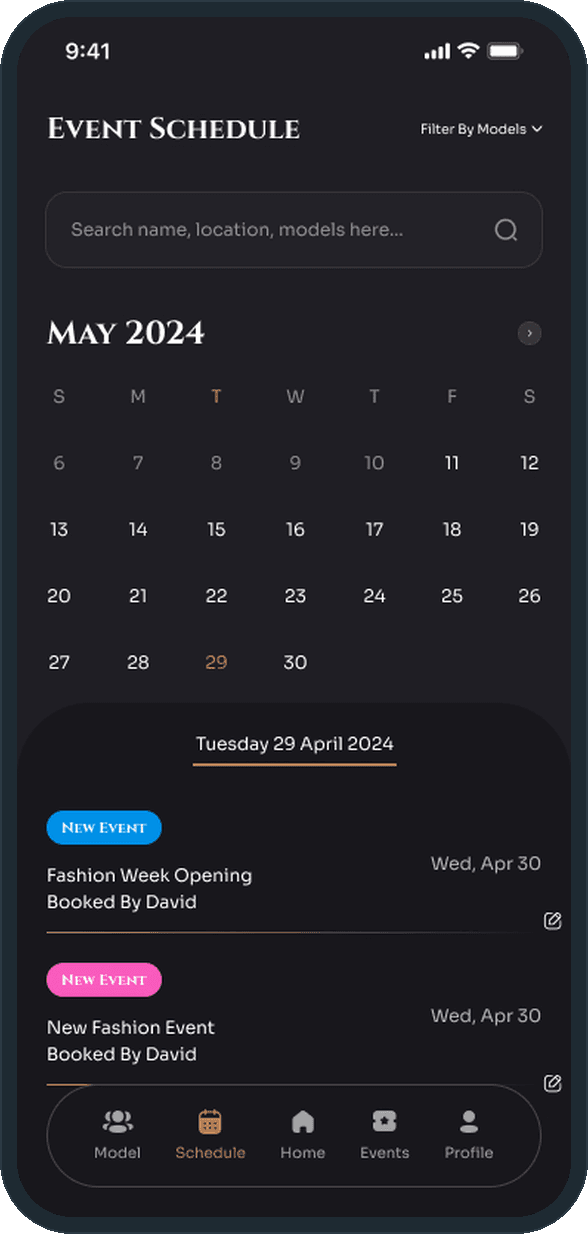
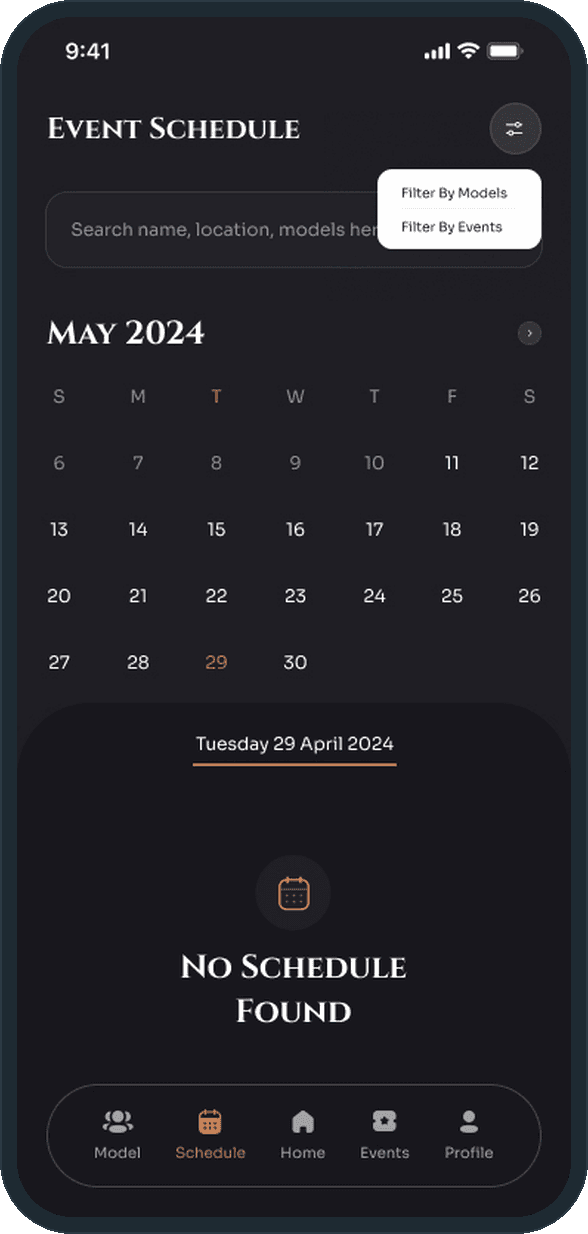
A month grid at the top of the screen, with the selected day in copper, and under it a raised panel headed by the day. Each event on the day is a row: a colored type tag, the title, who booked it, the date and an edit control. A search sits above the grid, for a name, a location or a model, and a filter icon opens two choices, filter by models or filter by events. When the day holds nothing, the panel shows a calendar icon and the line No schedule found; the month stays where it was.

Why is the roster grouped by day?

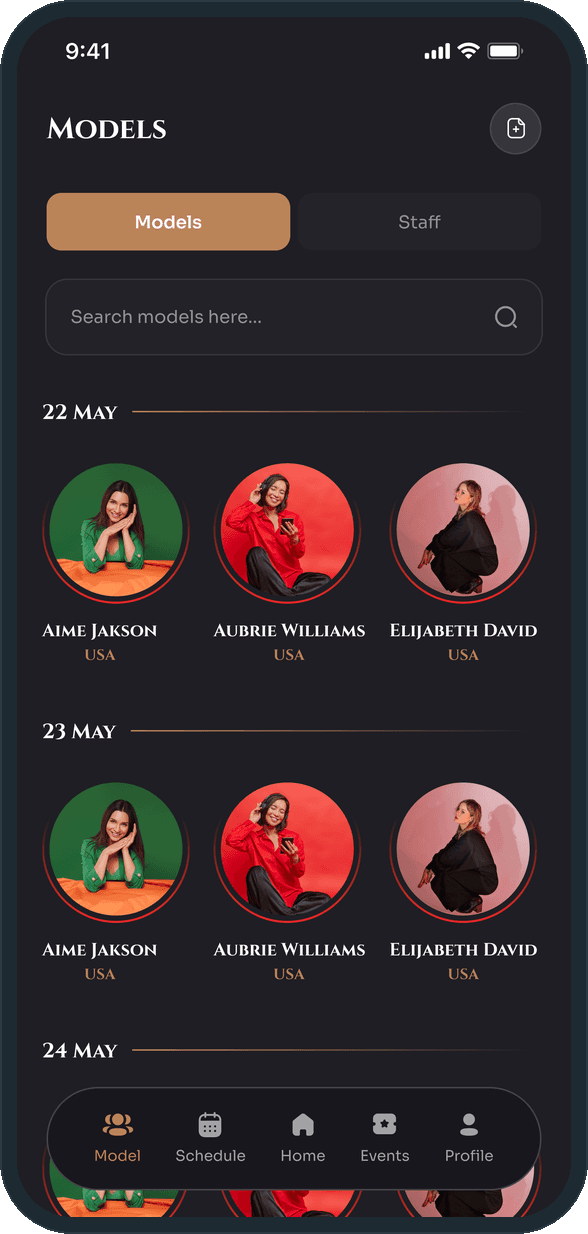
Because the question an agency asks is who is booked on the 23rd, not who is on the books. The Models tab groups the roster under dates, with each model's portrait, name and country, so the answer is on the first tab without opening the calendar. The Schedule tab answers the same question by event, and the two tabs sit side by side at the left of the tab bar.

How does the admin find and vet a model?

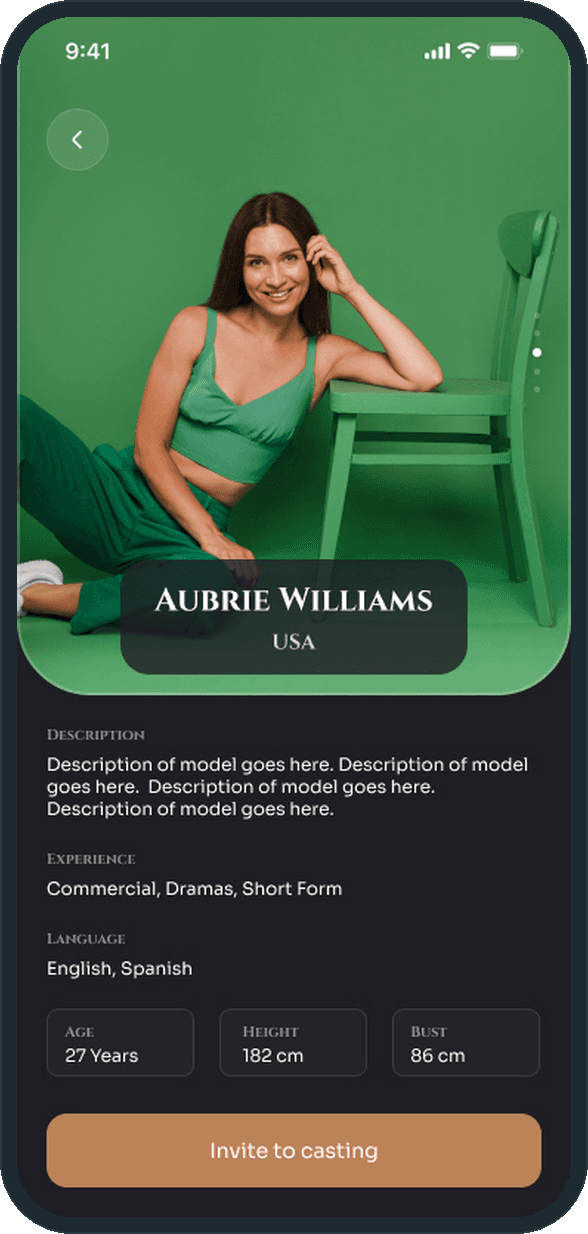
The Models tab lists the roster under a Models and Staff toggle and a search box, grouped by day, with the name and country under each portrait. Tapping a model opens the full-bleed portrait, a description, experience (commercial, dramas, short form), languages, and age, height and bust in three tiles. One button sits under all of it: Invite to casting.
  • Modeling agency admin: How does the admin find and vet a model?
  • Modeling agency admin: How does the admin find and vet a model?

How does the agency see what is booked on a day?

The Schedule tab is a month calendar with a search by name, location or model and a filter by models or by events. Tapping a day lists its events under the date on a raised panel: a colored type tag, the title, who booked it, the date and an edit control. A day with nothing on it says so on the same panel, with the month still in reach above.

  • Modeling agency admin: How does the agency see what is booked on a day?
  • Modeling agency admin: How does the agency see what is booked on a day?

How are events tracked?

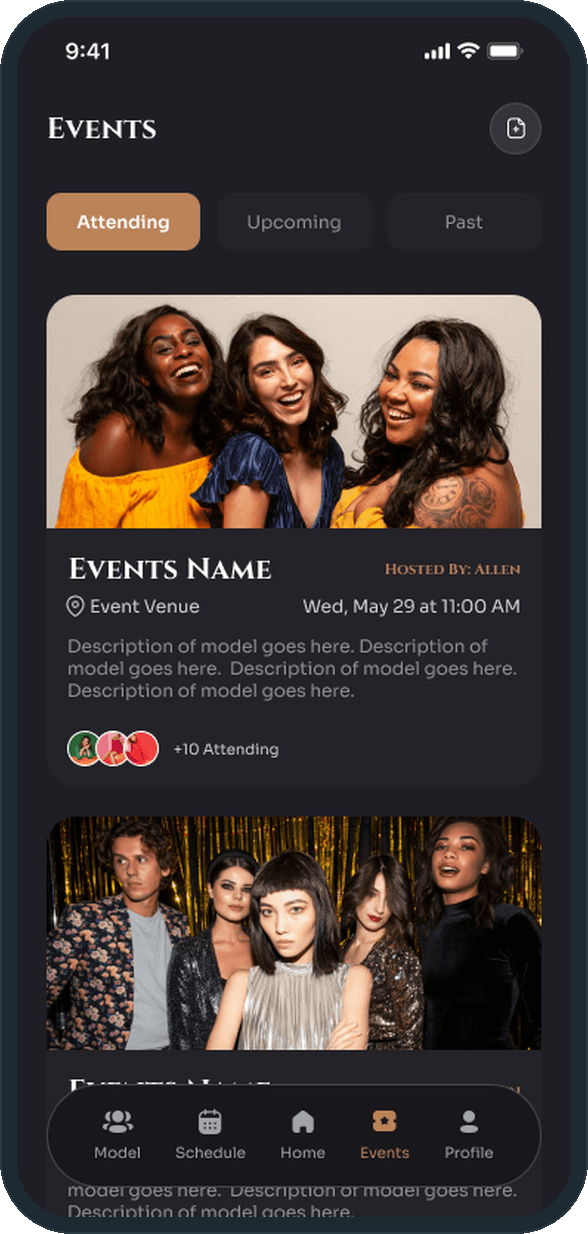
The Events tab splits Attending, Upcoming and Past. Each card carries the event photo, the name, the host, the venue, the date and time, a description and a stack of avatars with the attending count. The count sits beside three avatars as a number, so the admin reads how many are going without opening the card.

  • Modeling agency admin: How are events tracked?

Who is the app for?

The agency's admin, not the model. Onboarding opens on a full-bleed model photo over the line Top models in one place, with Skip and Get started. The welcome screen that follows offers Login or Sign Up as super admin: the person who signs in runs the roster, the calendar and the events.

  • Modeling agency admin: Who is the app for?

The decisions

  • The roster is grouped by day.

    The Models tab does not list the roster alphabetically. It groups the models under dates, so the admin reads who is booked on the 22nd, the 23rd and the 24th without opening the calendar. The Schedule tab answers the same question from the other side, by event.

  • One button on a model's page.

    Under the portrait, the description, the experience, the languages and the three measurement tiles there is one action: Invite to casting. Everything the admin needs to decide sits above it, and the decision is one tap.

  • The month and the day share one screen.

    The month grid stays at the top of the Schedule tab and the selected day's events open under it on a raised panel. The admin never leaves the month to see what a day holds, and a day with no events says so in the same panel.

  • Dark ground, copper accent, serif display.

    A charcoal ground, one copper accent on buttons, rules and the active tab, and a serif small-caps display face over a light sans body. The photographs carry the color; the interface around them is one dark tone with one accent, and the tab bar floats as a pill above the content.

What was the outcome?

Built and delivered in under 6 months

One outcome per item, dated, or not disclosed: never an estimate.

More screens

  • Modeling agency admin
  • Modeling agency admin

Which of our services apply

Common questions

Did Plainbuilt build the modeling agency admin app?

Yes. Plainbuilt designed and built it full stack and delivered it in under 6 months.

What does the modeling agency admin app do?

It is the agency's side of the app. The admin browses the model roster, opens a model's profile and invites them to a casting, reads a month calendar of events with each day's bookings, tracks events under Attending, Upcoming and Past, and edits an event's details.